


Layout Presets
New Screens


New Nav and Recording Bars


Camera Control
Revamp

Role
UX Researcher & Designer
Timeframe
Spring 2026 Semester
Platform
In-Studio Software & Website
Team
8 UX Designers
Overview
Purdue Video Express is a self-service recording system that allows students, faculty, and staff to create video content through recording studios across campus. The existing experience is designed around users controlling their recording through a tablet interface before receiving the finished recording through the Video Express website.
I worked on this project as part of Purdue’s Experience Studio, where our eight-person team was tasked with expanding the Video Express experience to support multi-camera switching and audio-only recording. Our goal was to introduce these more advanced capabilities without sacrificing the simplicity and familiarity of the existing system.
Problem Space
Central Question
How might we introduce multi-camera and audio-only recording tools without making the existing Video Express experience more complex?
User Group
Purdue students, faculty, and staff creating academic, instructional, or professional media. Wide range of skill levels.
Core Issues:
• The existing software lacked highly requested capabilities such as audio only features for podcasting, and multi camera support for higher production content.
• New functionality needed to remain familiar and consistent with the existing experience, as current users varied widely in technical ability and did not want to relearn the system.
• Users wanted greater customization control without sacrificing efficiency, adding unnecessary steps, or disrupting their existing workflow.
Research
01
Current State Analysis
02
Competitive Analysis
03
User Interviews
04
Journey Mapping
Current State Analysis
I started by immersing myself in the psychology of sports betting. Our literature review surfaced key behavioral concepts that would later inform our design decisions.
Takeaways
Learned about terms such as loss aversion, which drives users toward small bets with better odds, as well as confirmation bias, which means bettors rely on prior intuition and agreement over raw data.
These insights helped me understand that our design needed to prioritize scannability and give high-confidence metrics upfront, rather than burying users in hard-to-read data.


Click to View
Ideation
Turning Research Into Design Directions
With a clearer understanding of where users stood regarding the changes, and where adding complexity could become a problem, we began translating our research into possible UI layouts for the multi-camera and audio only modes.
We began with a Crazy 8s activity to quickly be able to display and compare our ideas. We then voted and grouped the strongest ideas through affinity mapping. These helped us move into wireframing with designs that were mutually approved of.

What Emerged
Flexible Camera Selection
Give users control over which cameras are active before and when recording. Making sure to keep the number of choices manageable.
Visible Camera Controls
Keep positioning, zoom, and camera previews readily accessible instead of hiding important controls behind additional navigation.
Clear Audio Feedback
Use visual volume indicators and microphone feedback to help users understand recording quality at a glance without having to navigate through different screens.
Approachable Additions
Introduce the more advanced functionality through familiar control styles, assets, and simple configuration rather than professional-grade interfaces.
Iteration & Validation
Exploring Different Layouts
Our first wireframes experimented with different levels of control, navigation, and information density. We explored variations in camera positioning, multi-view layouts, recording-mode selection, and audio controls while staying visually consistent with the existing Purdue interface.
First Round of A/B/C Testing
We conducted four A/B/C testing sessions, asking participants to compare variations and explain which layouts felt clearest and most efficient. S
Three themes consistently emerged:
Keep controls visible rather than hiding them behind additional navigation.
Reduce unnecessary clicks, especially while users are actively recording.
Favor simple, familiar layouts over interfaces that expose too much at once.
Developer Alignment
Before moving into high fidelity, I lead a meeting with Purdue IT developers to validate what was technically feasible. I described our proposed features, with the goal of confirming which ideas were feasible, identify where changes would require additional backend work, and make sure our designs could realistically move toward implementation.
Reality Check
Before the meeting, we were designing around what users wanted and what seemed valuable. After speaking with Purdue IT developers, we had a clearer understanding of the system’s technical constraints, which helped us narrow our ideas to features that were both useful and realistically implementable.
Refinement & Usability Testing
After incorporating developer feedback, we conducted a second round of A/B testing followed by usability testing to narrow the interaction patterns and validate the revised prototype in context.
The second round reinforced a preference for larger touchscreen controls, simpler layouts, single-screen access, and interaction patterns that remained familiar to the existing Video Express experience. Participants also preferred monitoring all microphones from one screen rather than navigating between separate views. SP26 Purdue IT Documentation (2)
We then tested the interactive prototype using two user scenarios representing different levels of familiarity with the system. While participants generally found the layout intuitive, testing revealed final issues including confusing “Advanced Recording” terminology, unclear camera labels, and controls that were too small. At the same time, users responded positively to the familiar toggle design, camera zoom interaction, and visual microphone feedback. SP26 Purdue IT Documentation (2)
Key takeaway:
The final rounds of testing confirmed that advanced functionality worked best when it was immediately visible, easy to understand, and consistent with interactions users already knew.
Final Designs

Recording Mode Selection
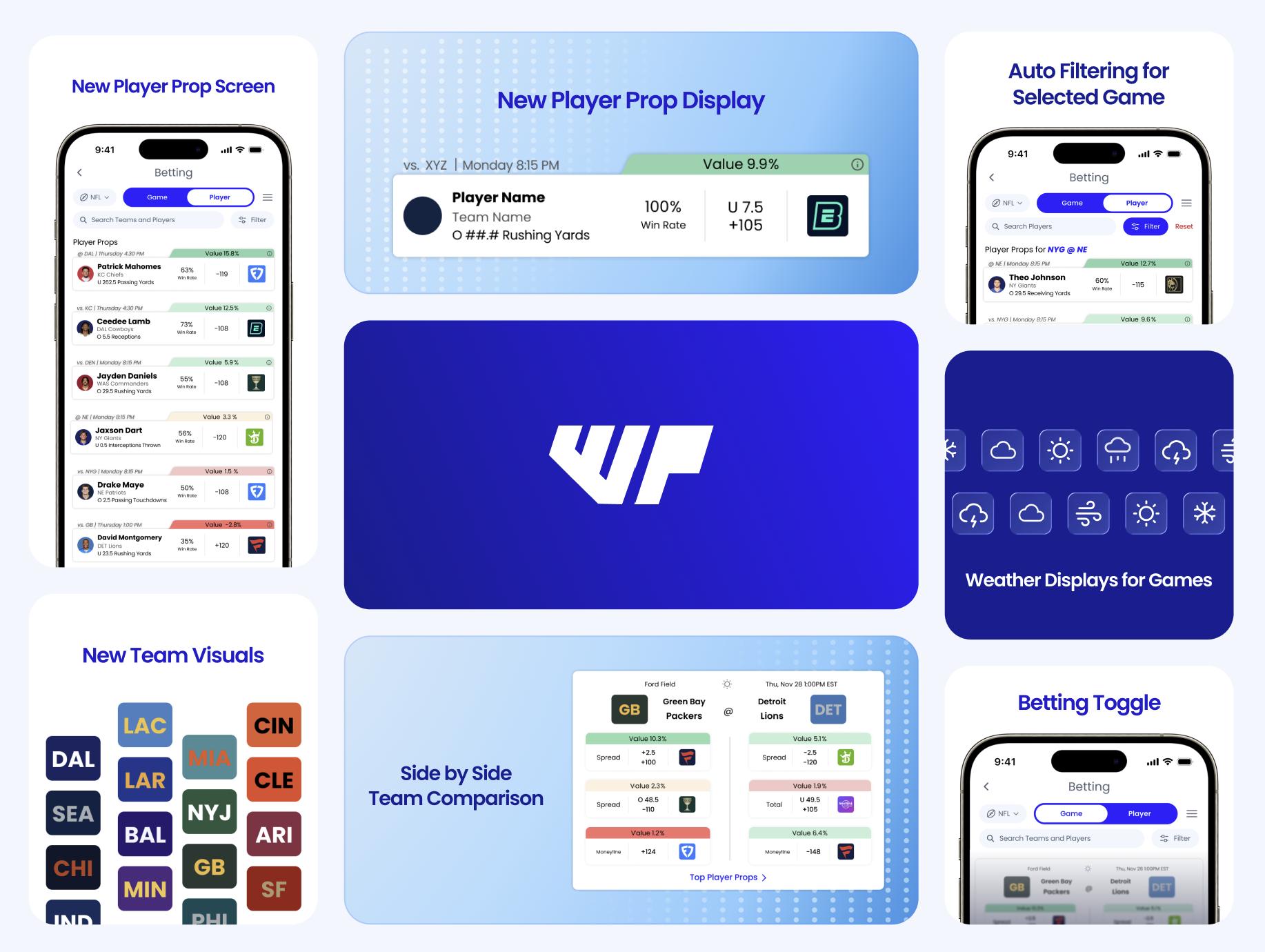
Unified Betting Page with Game/Player Toggle
The original app treated Game Betting and Player Props as entirely separate flows, creating a disjointed experience. The redesigned Betting page features a prominent Game/Player toggle at the top, allowing users to switch content with a single tap.
Vertical Card Layout for Game Betting
Our initial testing revealed that users felt overwhelmed by the horizontal, dense layout of the original betting screen. We implemented a vertical card layout that presents each matchup as a distinct card with teams displayed side-by-side.
Camera Configuration
Player and Team Displays
Player headshots and team logos were added to each card, as our research determined that increasing visuals to reduce cognitive load. Users can quickly identify players and teams without reading every line of text.
Refining Terminology
“EV Edge” was renamed to “Value" to clear up confusion, and moved to a high-visibility tab on the top of each card. This ensured that that most important metric was understandable and easy to see


Presentation and Camera Controls
Auto-Filtering for Selected Games
Added a simple filter system that allowed users to sort by games or individual athalete matchups. A blue banner confirms that the filters are active.
Enhanced Search and Filtering
An enlarged search bar now spans the full width of the screen, with dedicated filter and sort options. This helped users wanting quick access to specific players or matchups without scrolling through the entire list.
Audio Monitoring
Weather Icons and Contextual Data
In our interviews, users heavily requested the addition of weather information, therefore, small weather icons were added to game cards to provide at-a-glance information for coming games.
Scalable Team Visual System
Instead of sport specific assets like football helmets or basketball jerseys, we designed color-coded rectangular blocks with team abbreviations. This universal visual language scales to all sports without requiring unique design assets for every league.

Reflection
Designing More Without Making Users Learn More
This project challenged me to think about innovation differently. Adding functionality was easy; the harder problem was deciding how much of that functionality users should actually have to see and manage. Throughout testing, we repeatedly found that users valued visible controls, fewer interactions, and familiarity with the existing experience. SP26 Purdue IT Documentation (2)
I also learned how important it is to bring technical feasibility into the design process early. Our developer conversations changed several assumptions we had made during ideation and pushed us toward solutions that balanced user needs with what the existing system could realistically support.
If I Had One More Sprint
I would bring the prototype back into the physical Video Express studios and test the final interactions directly on the touchscreen hardware. Moving from a Figma prototype into the environment where users are simultaneously presenting, recording, and managing equipment would help validate whether the simplicity we designed on-screen holds up in practice.